
Great "how to"
My van has the CD/MP3 head unit, do you think this could be swapped out for the later touchscreen unit you have fitted.
Looking at the touchscreen units on eBay, they dont seem like they would be the same physical size as the CD player thats there now.
*NOW BOOKED FOR 2026* Transitmania 17 @ Santa Pod 17th to 19th July 2026 *ALL DETAILS HERE*
Non Sync to SYNC 2.5 Upgrade, with part numbers - completed!
61 posts
• Page 2 of 5 • 1, 2, 3, 4, 5
Re: Non Sync to SYNC 2.5 Upgrade, with part numbers - comple
 by t0m541 » Wed Jul 10, 2024 7:31 am
15 plate Custom 2.2 Trend eTech in black, it's so good to be back in a Transit...
- t0m541
- Transit Aficionado

- Posts: 249
- Joined: Mon Jun 30, 2014 3:37 pm
Re: Non Sync to SYNC 2.5 Upgrade, with part numbers - comple
by mafty » Sat Jul 13, 2024 12:41 pm
t0m541 wrote:Great "how to"
My van has the CD/MP3 head unit, do you think this could be swapped out for the later touchscreen unit you have fitted.
Looking at the touchscreen units on eBay, they dont seem like they would be the same physical size as the CD player thats there now.
Post a picture of what you have at the moment and I'll have a look.
Di! Ecce hora! Uxor mea me necabit!
-

mafty - Transit Aficionado
- Posts: 391
- Joined: Thu May 10, 2007 7:57 am
- Location: Weston super mare, Somerset
Re: Non Sync to SYNC 2.5 Upgrade, with part numbers - comple
by t0m541 » Sun Jul 14, 2024 9:22 am
Not my actual van, but my dash exactly.
I've bought the head unit that you got, which I'm going to fit in palce of the CD player anyway.
I've bought the head unit that you got, which I'm going to fit in palce of the CD player anyway.
You do not have the required permissions to view the files attached to this post.
15 plate Custom 2.2 Trend eTech in black, it's so good to be back in a Transit...
- t0m541
- Transit Aficionado
- Posts: 249
- Joined: Mon Jun 30, 2014 3:37 pm
Re: Non Sync to SYNC 2.5 Upgrade, with part numbers - comple
by t0m541 » Tue Jul 16, 2024 7:08 pm
Had a tinker around today, pulled the dash front off and extracted the CD player.
The connections on the back of it are nothing like the ones for the later head unit.
Also the newer unit is physically deeper than the CD player and won't fit in the aperture, it sticks proud by around 20mm.
So that's not getting fitted either.
I'll be putting it up for sale, I'm sure someone with a 2018 on van will be needing one.
The connections on the back of it are nothing like the ones for the later head unit.
Also the newer unit is physically deeper than the CD player and won't fit in the aperture, it sticks proud by around 20mm.
So that's not getting fitted either.
I'll be putting it up for sale, I'm sure someone with a 2018 on van will be needing one.
15 plate Custom 2.2 Trend eTech in black, it's so good to be back in a Transit...
- t0m541
- Transit Aficionado
- Posts: 249
- Joined: Mon Jun 30, 2014 3:37 pm
Re: Non Sync to SYNC 2.5 Upgrade, with part numbers - comple
by mafty » Mon Jul 22, 2024 6:00 pm
t0m541 wrote:Had a tinker around today, pulled the dash front off and extracted the CD player.
The connections on the back of it are nothing like the ones for the later head unit.
Also the newer unit is physically deeper than the CD player and won't fit in the aperture, it sticks proud by around 20mm.
So that's not getting fitted either.
I'll be putting it up for sale, I'm sure someone with a 2018 on van will be needing one.
That's a shame. I would love to see one fitted in a pre facelift.
I guess you're stuck with an insanely expensive brand name, with adapter plate, or an Android unit.
Someone will definitely snap that one up from you though.
Di! Ecce hora! Uxor mea me necabit!
-
mafty - Transit Aficionado
- Posts: 391
- Joined: Thu May 10, 2007 7:57 am
- Location: Weston super mare, Somerset
Re: Non Sync to SYNC 2.5 Upgrade, with part numbers - comple
by deputyweaver » Thu Jul 25, 2024 12:42 pm
Hi. Brilliant amount of information given here. I have a 2018 transit custom base model. So it currently has a single din radio in it as opposed to the 4" unit you had originally. I have got the screen and head unit seen here,https://www.ebay.co.uk/itm/196492176845
I know I can get a new dash fascia and mounting bracket that will enable me to mount the screen. My question is will the head unit I've bought work or do I need a different one?
I know I can get a new dash fascia and mounting bracket that will enable me to mount the screen. My question is will the head unit I've bought work or do I need a different one?
- deputyweaver
- Newbie
- Posts: 2
- Joined: Wed Jul 17, 2024 9:28 am
Re: Non Sync to SYNC 2.5 Upgrade, with part numbers - comple
by deputyweaver » Fri Jul 26, 2024 12:20 pm
Great guide thank you. Have had a look and see some of the parts I need to give this a go.
I'll be going from a basic radio so think I need to do a few extra steps. I've found the trim and bracket I need for the screen attachment. I already have the screen and sync module. Just need to get the head unit. Right now I'm trying to figure out wiring.
So this is the sync module I've got:
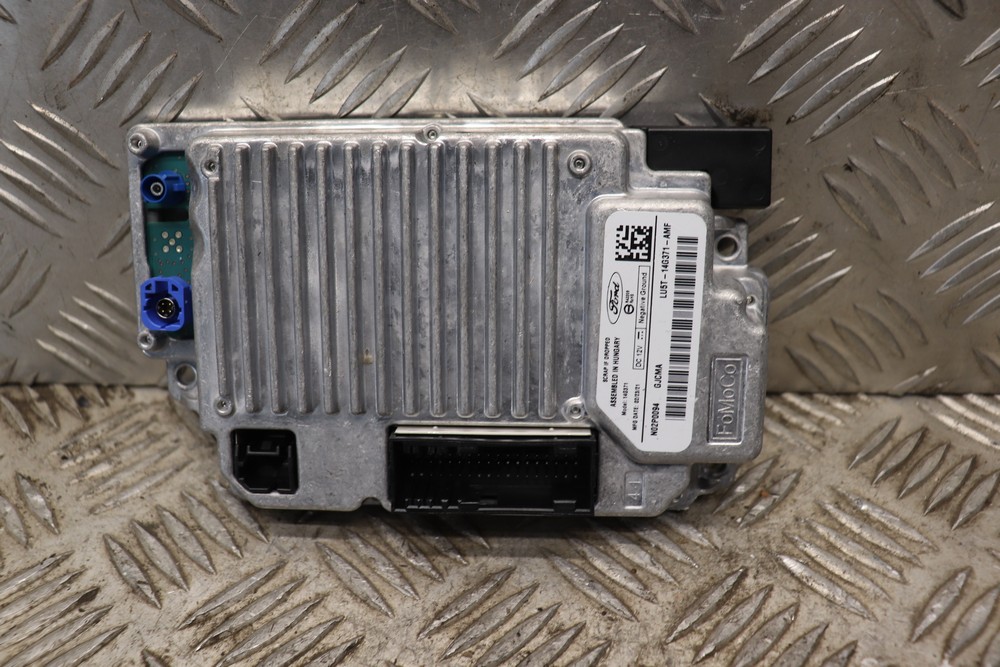
I know I need to get a wire likeThis wire I believe connects the sync module (blue connectors) to the head unit (black and white connectors) and the screen (yellow and black connectors).
What I'm unsure of is what the remaining connector on the sync module is for? I've seen some online say this is for adding a reversing camera to your van (which is something I plan to do).
I believe this is the head unit I need to get:
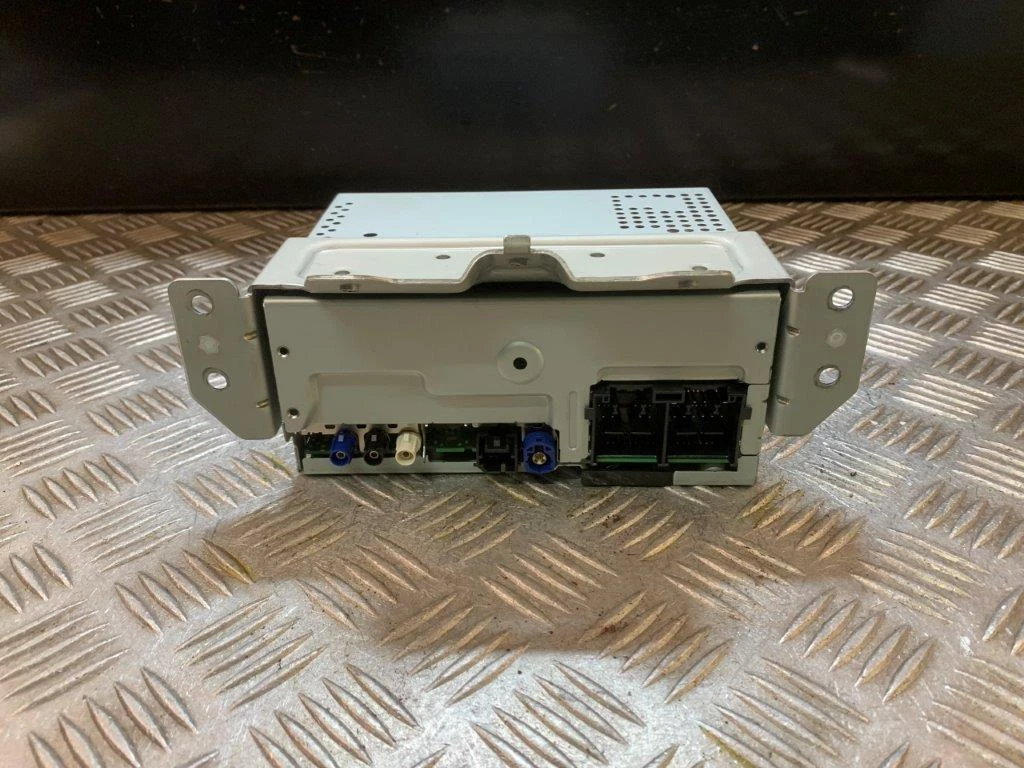
I assume the wires in my current unit need to go into this new one. However the two large pin connectors on the right are a different shape to my current unit. So I assume I'll need an adaptor of some sort. That will leave me with some connectors that I haven't used on the head unit. Will this be for more optional upgrades?
Is there anything else I'm missing? Appreciate any help you can give!
Cheers,
Iain
I'll be going from a basic radio so think I need to do a few extra steps. I've found the trim and bracket I need for the screen attachment. I already have the screen and sync module. Just need to get the head unit. Right now I'm trying to figure out wiring.
So this is the sync module I've got:
I know I need to get a wire likeThis wire I believe connects the sync module (blue connectors) to the head unit (black and white connectors) and the screen (yellow and black connectors).
What I'm unsure of is what the remaining connector on the sync module is for? I've seen some online say this is for adding a reversing camera to your van (which is something I plan to do).
I believe this is the head unit I need to get:
I assume the wires in my current unit need to go into this new one. However the two large pin connectors on the right are a different shape to my current unit. So I assume I'll need an adaptor of some sort. That will leave me with some connectors that I haven't used on the head unit. Will this be for more optional upgrades?
Is there anything else I'm missing? Appreciate any help you can give!
Cheers,
Iain
- deputyweaver
- Newbie
- Posts: 2
- Joined: Wed Jul 17, 2024 9:28 am
Re: Non Sync to SYNC 2.5 Upgrade, with part numbers - comple
by t0m541 » Sat Jul 27, 2024 10:37 am
I have one of those.
I bought it for my 15 reg van along with the harness, but it physically doesn't fit where the CD unit is in the dash, it's too long.
This one is from a 22reg van.
It's no good to me if you're interested pm me
You do not have the required permissions to view the files attached to this post.
15 plate Custom 2.2 Trend eTech in black, it's so good to be back in a Transit...
- t0m541
- Transit Aficionado
- Posts: 249
- Joined: Mon Jun 30, 2014 3:37 pm
Re: Non Sync to SYNC 2.5 Upgrade, with part numbers - comple
by liongreen » Tue Oct 01, 2024 3:30 pm
Hi
Just bought all that parts with an extra FORD / Transit Custom USB-C PORT / NK4T-14F014-AA
Head unit - LK2T-18D804-HH
Screen - L1BT-18B955-FB
Fiesta Loom - H1BT-14B079-SC
USB Media Hub - HS7T-14F014-AC
Just checking if that will work or need to get anything else to make it work, just spend like £463.00 in parts and really want make it work.
Just bought all that parts with an extra FORD / Transit Custom USB-C PORT / NK4T-14F014-AA
Head unit - LK2T-18D804-HH
Screen - L1BT-18B955-FB
Fiesta Loom - H1BT-14B079-SC
USB Media Hub - HS7T-14F014-AC
Just checking if that will work or need to get anything else to make it work, just spend like £463.00 in parts and really want make it work.
- liongreen
- Newbie
- Posts: 4
- Joined: Tue Oct 01, 2024 3:13 pm
Re: Non Sync to SYNC 2.5 Upgrade, with part numbers - comple
by mafty » Mon Oct 07, 2024 10:51 pm
liongreen wrote:Hi
Just bought all that parts with an extra FORD / Transit Custom USB-C PORT / NK4T-14F014-AA
Head unit - LK2T-18D804-HH
Screen - L1BT-18B955-FB
Fiesta Loom - H1BT-14B079-SC
USB Media Hub - HS7T-14F014-AC
Just checking if that will work or need to get anything else to make it work, just spend like £463.00 in parts and really want make it work.
Yep, that is all the same parts that I used, so if you follow my instructions it should all work fine.
Good luck, and let us know how you get on.
Di! Ecce hora! Uxor mea me necabit!
-
mafty - Transit Aficionado
- Posts: 391
- Joined: Thu May 10, 2007 7:57 am
- Location: Weston super mare, Somerset
Re: Non Sync to SYNC 2.5 Upgrade, with part numbers - comple
by liongreen » Sat Oct 12, 2024 2:41 pm
Mafty
After installing the head unit and screen I’m facing a problem with usb ports, literally stuck where to place the adapter and where to connect or soldering cables where to where. Everything working apart from usb where cuts almost instantly after few seconds and trying to connect again and cuts again.
Regards
After installing the head unit and screen I’m facing a problem with usb ports, literally stuck where to place the adapter and where to connect or soldering cables where to where. Everything working apart from usb where cuts almost instantly after few seconds and trying to connect again and cuts again.
Regards
- liongreen
- Newbie
- Posts: 4
- Joined: Tue Oct 01, 2024 3:13 pm
Re: Non Sync to SYNC 2.5 Upgrade, with part numbers - comple
by liongreen » Sat Oct 12, 2024 2:43 pm
Will add few pics of what I’ve done
- liongreen
- Newbie
- Posts: 4
- Joined: Tue Oct 01, 2024 3:13 pm
Re: Non Sync to SYNC 2.5 Upgrade, with part numbers - comple
by mafty » Sun Oct 13, 2024 10:38 am
liongreen wrote:Mafty
After installing the head unit and screen I’m facing a problem with usb ports, literally stuck where to place the adapter and where to connect or soldering cables where to where. Everything working apart from usb where cuts almost instantly after few seconds and trying to connect again and cuts again.
Regards
Ok, so the USB adapter that you got from Amazon or wherever, goes between the USB cable from the new media port (the one behind the steering wheel) to the plug below the screen which runs down to the lower USB port (next to the airbag, if you have one).
All the soldering takes place in the top binnacle behind the steering wheel - you need to take power from the 12v port cables and connect them to two of the cables on the 4 pin plug going into the new media port. See my original post for what colour goes where.
Hope this all malkes sense.
Maf
Di! Ecce hora! Uxor mea me necabit!
-
mafty - Transit Aficionado
- Posts: 391
- Joined: Thu May 10, 2007 7:57 am
- Location: Weston super mare, Somerset
Re: Non Sync to SYNC 2.5 Upgrade, with part numbers - comple
by liongreen » Mon Oct 14, 2024 10:54 am
Mafty the top one I’m trying to put type C instead of normal USB and the type C got 2 mini usb and need extra power. Do you think using same route that you explained will work or just work using normal usb?
Regards
Regards
- liongreen
- Newbie
- Posts: 4
- Joined: Tue Oct 01, 2024 3:13 pm
Re: Non Sync to SYNC 2.5 Upgrade, with part numbers - comple
by mafty » Thu Oct 17, 2024 5:36 pm
liongreen wrote:Mafty the top one I’m trying to put type C instead of normal USB and the type C got 2 mini usb and need extra power. Do you think using same route that you explained will work or just work using normal usb?
Regards
I've no idea whether USB C will work. I just emulated the setup in the original Transit Custom, using the part number I found from a Fiesta loom.
Sorry, can't help you with USB C.
Di! Ecce hora! Uxor mea me necabit!
-
mafty - Transit Aficionado
- Posts: 391
- Joined: Thu May 10, 2007 7:57 am
- Location: Weston super mare, Somerset
61 posts
• Page 2 of 5 • 1, 2, 3, 4, 5
Who is online
Users browsing this forum: No registered users